Quickstart
Minimal example
Get the data
To keep things simple and reproducible, let’s work with the reference E. coli genomes K12 and Sakai:
## download ecoli genome Sakai
wget \
  https://ftp.ncbi.nlm.nih.gov/genomes/all/GCF/000/008/865/GCF_000008865.2_ASM886v2/GCF_000008865.2_ASM886v2_genomic.fna.gz \
  -O ecoli_sakai.fna.gz && \
gzip -d ecoli_sakai.fna.gz

## download ecoli genome K12
wget \
  https://ftp.ncbi.nlm.nih.gov/genomes/all/GCF/000/005/845/GCF_000005845.2_ASM584v2/GCF_000005845.2_ASM584v2_genomic.fna.gz \
  -O ecoli_k12.fna.gz && \
gzip -d ecoli_k12.fna.gz
Prepare input
Before running the script, we must prepare the CSV that is used as input. This CSV must have:
<FASTA PATH>,<PREFIX>,<COLOR>
We can prepare this csv with:
echo "ecoli_k12.fna,K12,purple" > input.fofn
echo "ecoli_sakai.fna,SAKAI,lorange" >> input.fofn
The file must look like this (input.fofn):
ecoli_k12.fna,K12,purple
ecoli_sakai.fna,SAKAI,lorange
Create the circos plot
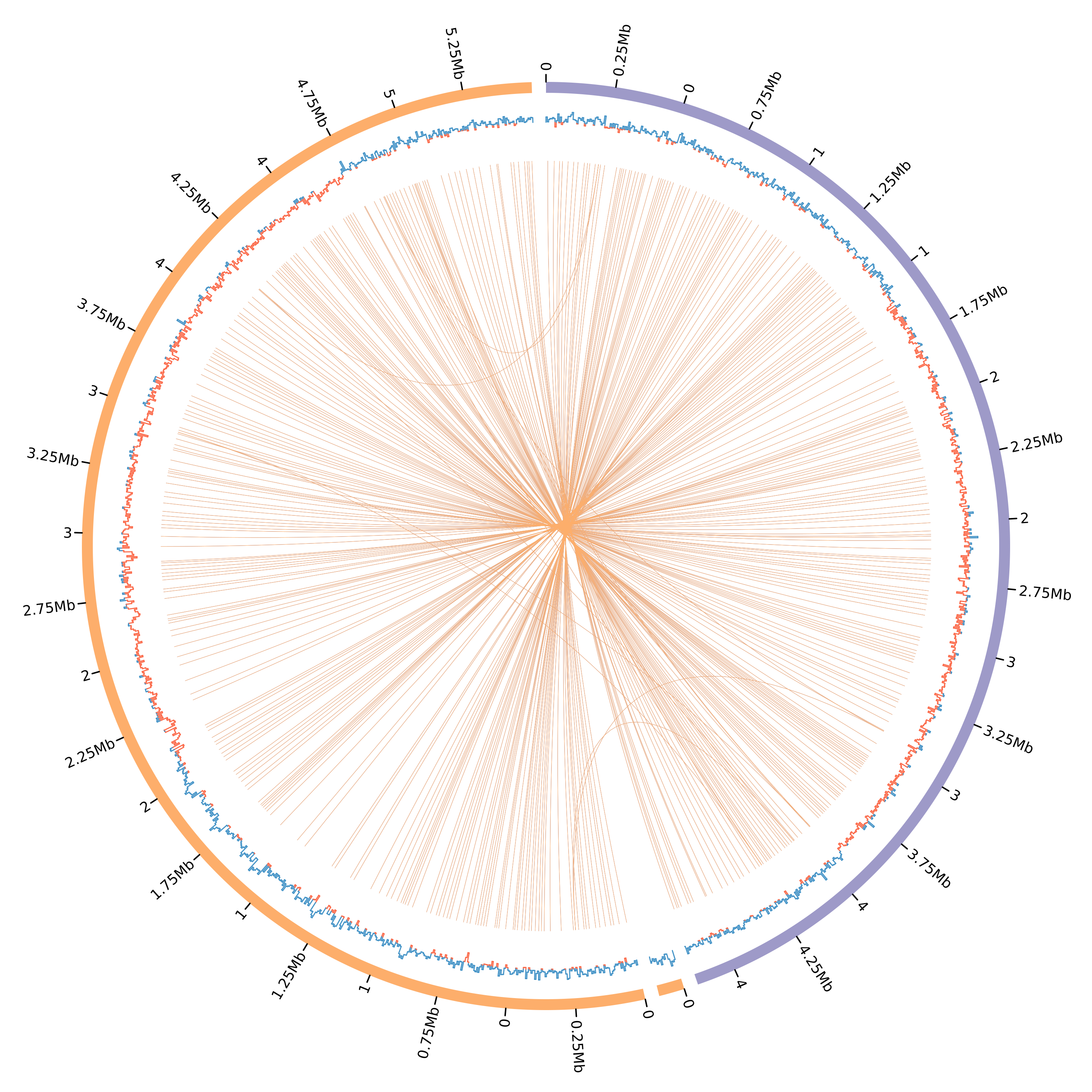
With that, we can finally create a minimal circos configuration file and plots having:
Ideograms
Tick marks
GC Skew
Similarity links
# run easy_circos
plot_circos --fofn input.fofn
This will create all the circos configuration files and required data files under the results folder (Can be changed with --outdir). See the created plot:
Tip
Click in the image for zoom.
Example with 2D tracks
Additionally, the scripts also makes it easy for you to draw plots with 2d tracks. For the moment, the 2D tracks available are:
Tiles
Text labels
The 2D tracks files must be configured as shown in the circos manual: http://circos.ca/documentation/tutorials/configuration/data_files.
We now that not all user’s are familiar with quick and easier ways to manipulate tabular data and, that the majority of genome annotation data are in GFF. Thus, we provide to quick functions with awk so that users can manipulate GFF files to create circos compliant TSVs for text labels and tiles. See below:
Note
We will use the same genomes and input.fofn file used above.
Download GFF file
Let’s get the GFF annotation file for both genomes:
# download ecoli k12 annotation
wget \
 https://ftp.ncbi.nlm.nih.gov/genomes/all/GCF/000/005/845/GCF_000005845.2_ASM584v2/GCF_000005845.2_ASM584v2_genomic.gff.gz \
 wget -O ecoli_k12.gff.gz
gzip -d ecoli_k12.gff.gz

# download ecoli sakai annotation
wget \
 https://ftp.ncbi.nlm.nih.gov/genomes/all/GCF/000/008/865/GCF_000008865.2_ASM886v2/GCF_000008865.2_ASM886v2_genomic.gff.gz \
 wget -O ecoli_sakai.gff.gz
gzip -d ecoli_sakai.gff.gz
Create text labels
For creating text labels we provide an script that is executed as:
plot_circos [ --gff2labels <FEATURES> <PATTERN> <ATTRIBUTE> <COLOR> <GFF> ]
Option |
Description |
|---|---|
|
select GFF lines that has this string as features (3rd column). |
|
select GFF lines that have this pattern (anywhere). |
|
use the value of this key from the GFF attributes columns (9th column) as the features’s labels |
|
give these features the following color |
|
the GFF file to parse |
Note
For <FEATURES> and <PATTERN> users can use "" to match anything, and "|" to match
more than one string. E.g. plot_circos --gff2labels "" "acrA|mdt" ID red ecoli_k12.gff.
Thus, to create a circos-compliant text label file we can run:
# Sakai GFF features
# search all lines with feature type "CDS" (3rd column)
# all lines that have the pattern "resistance"
# getting the value of the "gene" key in the 9th column as label
# creating text label colors as "black"
plot_circos --gff2labels CDS resistance gene black ecoli_sakai.gff > circos_labels.txt

# K12 GFF features
# search all lines with feature type "rRNA" (3rd column)
# any line related to rRNA features, using "" as pattern
# getting the value of the "ID" key in the 9th column as label
# creating text label colors as "vdred"
plot_circos --gff2labels rRNA "" ID vdred ecoli_k12.gff >> circos_labels.txt
Note
You can create any labels as you like. You must only config them correctly and concatenate them in a single file.
The file must look like this:
#chr start   end     label   options comment
NC_002695.2  5700    6476    yaaA    color=black     # attributes: ID=cds-NP_308033.1;Parent=gene-ECs_0006;Dbxref=Genbank:NP_308033.1;Name=NP_308033.1;gbkey=CDS;gene=yaaA;locus_tag=ECs_0006;product=peroxide resistance protein;protein_id=NP_308033.1;transl_table=11
NC_002695.2  123771  124625  ampE    color=black     # attributes: ID=cds-NP_308142.1;Parent=gene-ECs_0115;Dbxref=Genbank:NP_308142.1;Name=NP_308142.1;gbkey=CDS;gene=ampE;locus_tag=ECs_0115;product=ampicillin resistance inner membrane protein AmpE;protein_id=NP_308142.1;transl_table=11
NC_002695.2  360441  361034  rclC    color=black     # attributes: ID=cds-NP_308366.1;Parent=gene-ECs_0340;Dbxref=Genbank:NP_308366.1;Name=NP_308366.1;gbkey=CDS;gene=rclC;locus_tag=ECs_0340;product=reactive chlorine species stress resistance inner membrane protein;protein_id=NP_308366.1;transl_table=11
NC_002695.2  361391  362716  rclA    color=black     # attributes: ID=cds-NP_308369.2;Parent=gene-ECs_0342;Dbxref=Genbank:NP_308369.2;Name=NP_308369.2;gbkey=CDS;gene=rclA;locus_tag=ECs_0342;product=pyridine nucleotide-dependent disulfide oxidoreductase of reactive chlorine stress species RCS resistance;protein_id=NP_308369.2;transl_table=11
[...]
Create tiles
For creating circos tiles we provide an script that is executed as:
plot_circos [ --gff2tiles <FEATURES> <PATTERN> <COLOR> <GFF> ]
Option |
Description |
|---|---|
|
select GFF lines that has this string as features (3rd column). |
|
select GFF lines that have this pattern (anywhere). |
|
give these features the following color |
|
the GFF file to parse |
Tip
For <FEATURES> and <PATTERN> users can use "" to match anything, and "|" to match
more than one string. E.g. plot_circos --gff2tiles "" "acrA|mdt" red ecoli_k12.gff.
We will create the tiles for the same features that we used for the labels. Just to keep it simple. But, we could create for any feature. Thus, to create our circos compliant tiles file for the same features we can run:
# Sakai GFF features
# search all lines with feature type "CDS" (3rd column)
# all lines that have the pattern "resistance"
# creating tiles colors as "black"
plot_circos --gff2tiles CDS resistance black ecoli_sakai.gff > circos_tiles.txt

# K12 GFF features
# search in the all lines with feature type "rRNA" (3rd column)
# any line related to rRNA features, using "" as pattern
# creating tiles colors as "vdred"
plot_circos --gff2tiles rRNA "" vdred ecoli_k12.gff >> circos_tiles.txt
The file must look like this:
#chr    start   end     options comment
NC_002695.2     5700    6476    color=black     # attributes: ID=cds-NP_308033.1;Parent=gene-ECs_0006;Dbxref=Genbank:NP_308033.1;Name=NP_308033.1;gbkey=CDS;gene=yaaA;locus_tag=ECs_0006;product=peroxide resistance protein;protein_id=NP_308033.1;transl_table=11
NC_002695.2     123771  124625  color=black     # attributes: ID=cds-NP_308142.1;Parent=gene-ECs_0115;Dbxref=Genbank:NP_308142.1;Name=NP_308142.1;gbkey=CDS;gene=ampE;locus_tag=ECs_0115;product=ampicillin resistance inner membrane protein AmpE;protein_id=NP_308142.1;transl_table=11
NC_002695.2     360441  361034  color=black     # attributes: ID=cds-NP_308366.1;Parent=gene-ECs_0340;Dbxref=Genbank:NP_308366.1;Name=NP_308366.1;gbkey=CDS;gene=rclC;locus_tag=ECs_0340;product=reactive chlorine species stress resistance inner membrane protein;protein_id=NP_308366.1;transl_table=11
NC_002695.2     361391  362716  color=black     # attributes: ID=cds-NP_308369.2;Parent=gene-ECs_0342;Dbxref=Genbank:NP_308369.2;Name=NP_308369.2;gbkey=CDS;gene=rclA;locus_tag=ECs_0342;product=pyridine nucleotide-dependent disulfide oxidoreductase of reactive chlorine stress species RCS resistance;protein_id=NP_308369.2;transl_table=11
[...]
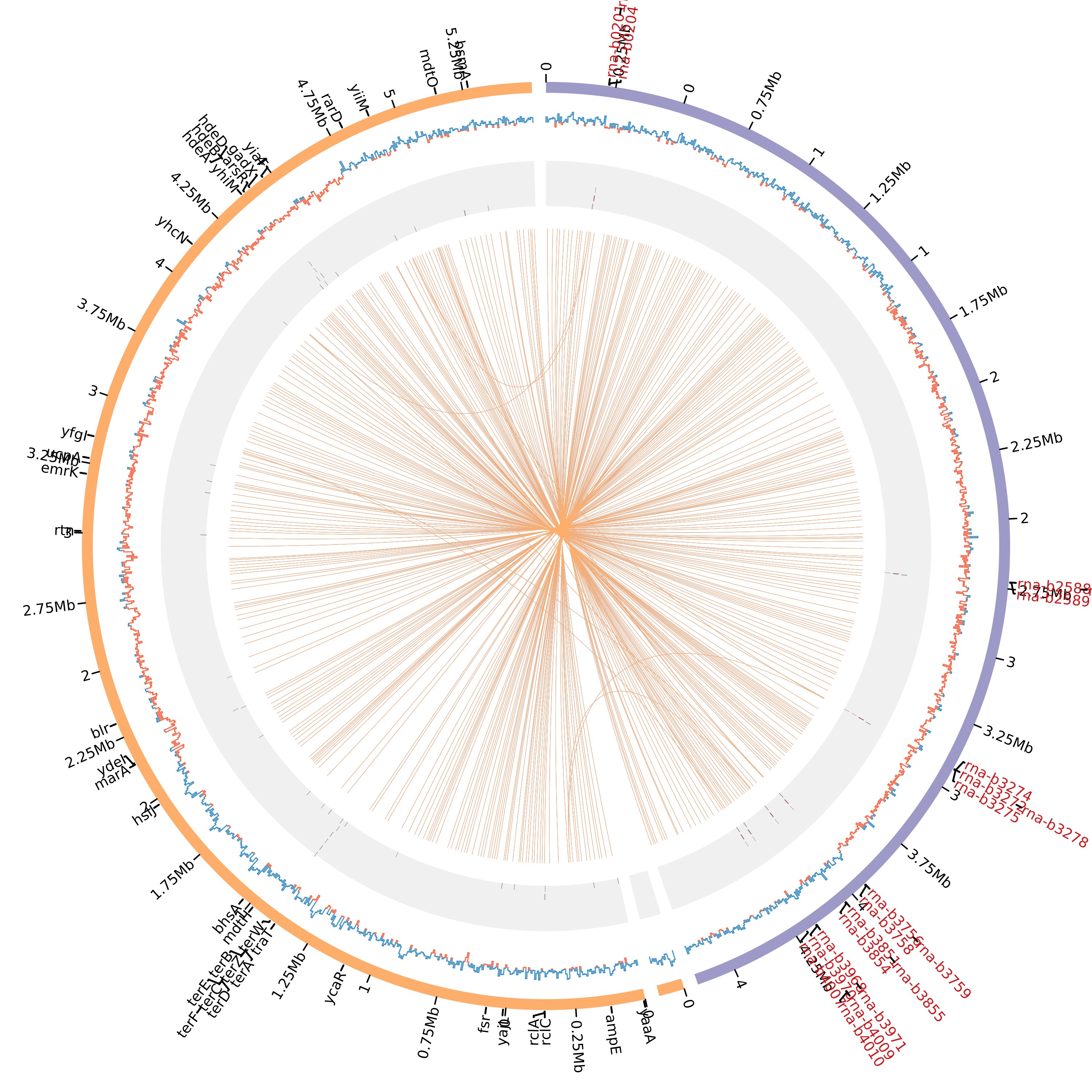
Create the circos plot
With that, we can finally create a minimal circos configuration file and plots having:
Ideograms
Tick marks
GC Skew
Similarity links
Text labels
Tiles
# run easy_circos
plot_circos --fofn input.fofn --labels circos_labels.txt --tiles circos_tiles.txt --threads 7
This will create all the circos configuration files and required data files under the results folder (Can be changed with --outdir). See the created plot:
Tip
Click in the image for zoom.
Takeaway notes
Under the results/conf file you will have all the circos configuration plots. With that, you can further customize and increment the plot as you desire. For that, you must understand circos conf files. See their manual